Introduction
At a Glance
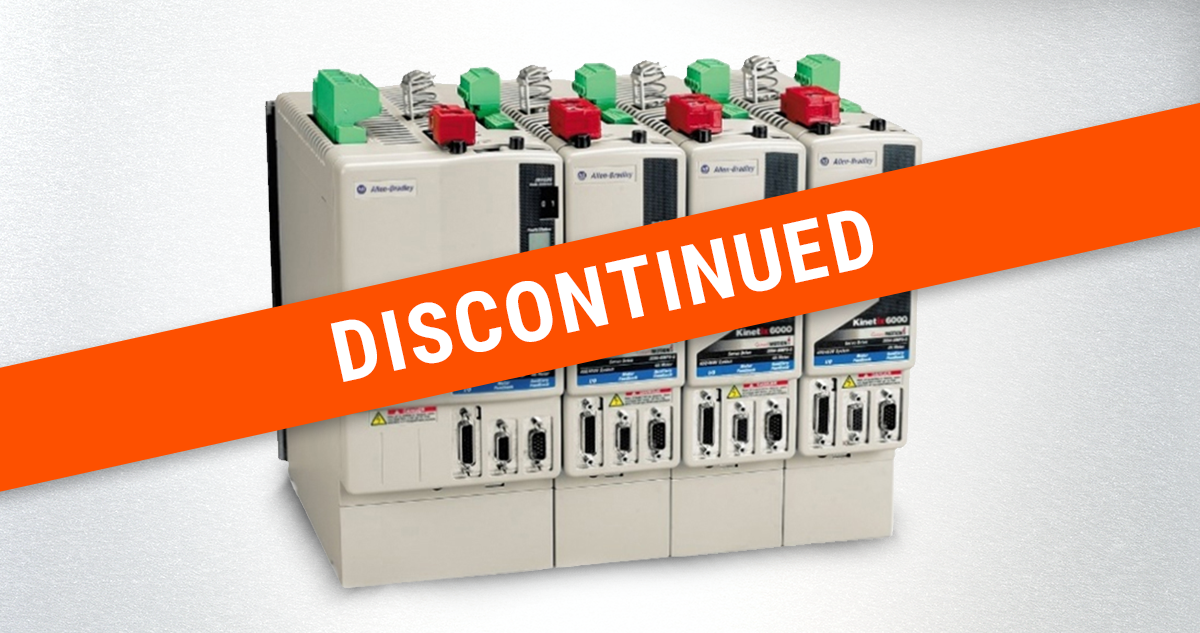
The Allen-Bradley Kinetix 6000 (K6000) went “legacy” in 2023. The drives still run, but Allen-Bradley stopped producing new ones. What this means is that available supply is made up of units that vary in age and series. This can cause sourcing and integration problems.
Obsolete status, alone, is not a reason to replace. Here are three options of how to proceed:
- Hold – your back-up supply is stable, and you know their compatibility
- Source – source aftermarket with attention paid to drive series and firmware
- Migrate – your fault rate is rising, you don’t have spares, and it’s hard to find compatible drives
Related resource: The K6000 is only one example of controls obsolescence. For more general information on approaching controls obsolescence and upgrades, take a look at our companion article: “Electronic Controls Upgrades: A Practical Guide to Managing Obsolescence.”
The K6000 was Allen-Bradley’s flagship servo drive. It came out in the early 2000s and stayed in production for more than 20 years. In 2023, Allen-Bradley moved it to “legacy” status – they made it obsolete. This means that the part is no longer in production but is still used in operations with older machines.
While Douglas no longer builds with the K6000, these drives are still in use on our existing machines. In many operations, they’re still the drive that’s doing the work. Its function is to convert motion commands from the programmable logic controller (PLC). The result is precise cam profiles and servo motor positioning so that a line can accurately run at speed.
In this article, we’ll cover:
- What actually changed with the K6000 obsolescence
- What failure risk to plan for
- The three ways to manage a K6000 base
- When holding is the right call
- How to evaluate the success of your decision
- Three questions to ask yourself to evaluate your position
How Does Obsolescence Change Things?
What obsolescence does not mean is that it has stopped working, or that you’re on a deadline to replace it. Practically speaking, obsolescence means that Allen-Bradley is no longer building new K6000 drives. Every unit that is available is a used unit – or at least something that has been on a shelf somewhere.
It’s important to remember that these drives don’t run independently. They are part of a fiber-optic ring network called the Serial Real-Time Communication System (SERCOS). It daisy-chains drives together and back to the PLC, passing motion data as pulses of light. This is where replacement gets complicated: if you replace one drive, it has to integrate with the rest of the SERCOS ring.
What Risk Should I Plan For?
The risk that is worth planning around now is not that a K6000 fails. All drives fail at some point. What you should plan around is when replacement comes, the drive you source may not communicate with the rest of the SERCOS ring until its firmware matches.
The K6000 shipped in series A through D over the course of its lifetime. This means that if you pull a used drive off the shelf, there’s a good chance that it arrives on a different firmware revision than your rack expects. The drive can be flashed to a compatible version, but until you do that, the rack won’t be fully operational.
Note: Newer series had additional capabilities like the safe-off safety circuit (for example). So, an older series drive in a newer ring may need additional hardware as well as firmware.
If teams are not aware of K6000 functionality and history, this setback can catch them off-guard. They can spend the recovery window chasing an integration problem rather than a hardware one.
Pro Tip
Allen-Bradley firmware versions read as “major.minor” — the number after the dot is a separate minor-revision count, not a decimal. That means a version like 1.89 can actually be newer than 1.113, because 89 and 113 are minor-revision numbers, not values after a decimal point. It’s a common source of confusion when comparing two drives’ firmware. Confirm the specific cross-series compatibility versions with a Douglas service technician for your machine before you order.
How Should I Proceed with My K6000?
Now that you understand the problem comes down to supply and integration, you have three options. They aren’t a sequence, but postures. The right one for your line depends on your present situation and exposure.
- Hold and Run
- Source Aftermarket Deliberately
- Migrate to Current-Generation Drives
- A climbing fault rate on the drives
- A drive-series mix that is hard to keep compatible
- An open capital window that lets you plan the change instead of forcing it
If your line is stable and you have a healthy supply of compatible spares, holding is the right strategy. The drives are proven effective, you have back-ups, and there’s no legitimate reason to spend capital. To proceed, keep an eye on what spares you have in inventory (including series and firmware).
Once your spares start to disappear, you should build a sourcing posture before you need it. The used market is now the only market, so always make sure to verify what you’re buying. Track the hardware series, the firmware revision, and whether it will require a flash to match your rack. This will prepare you for when failures come.
Migration becomes the right answer when one of three things happens:
Allen-Bradley’s current-generation successor is the K5700. It brings with it some real improvements: the motor feedback cabling is better insulated and consolidated. This means a class of electrical-noise problems are resolved. Plan for your migration as a project, not just a part swap.
When Is Holding the Right Call?
As we mentioned in the previous section, holding is sometimes the right move. Regardless of how old your drive is, migrating early is the wrong call. If your installed base is stable, your spares are plentiful, and your fault rate is flat, stay where you’re at.
The case for migrating grows when the risk changes. If you meet these criteria, you should hold:
- You can source compatible spares
- Your drives aren’t faulting more than they used to
- Your series mix is manageable
Douglas is experienced with the K6000 and builds with the K5700. We support the line that holds and the line that moves. Evaluate the situation your numbers imply.
How Do I Know if I Made the Right or Wrong Choice?
You have a line that is down for longer than the repair warrants. Replacement couldn’t be sourced in time, or the part arrived on the wrong firmware and wouldn’t integrate. This avoidable downtime will occur if you’re caught without a known-compatible spare.
Your line runs calmly. You know how many spares you have, what series and firmware they’re on, and whether your fault rate is trending up. A drive failure is a planned recovery rather than a scramble. If migration is coming, you have it scoped as a capital project on your timeline.
How Do I Evaluate My Situation?
To evaluate where you’re at, ask yourself three questions:
- How many spares do I have? Do I know their series and firmware?
- Is my fault rate on the drives flat or climbing?
- How mixed is my drive-series population? Is it getting hard to keep them compatible?
If you answer question 1 with “deep and known,” question 2 with “flat,” and question 3 with “not mixed and easy,” holding is a good option. If you answer any other way to these questions, the migration discussion should begin to enter meeting conversations.
If you’re not sure where your installed base actually stands, you should have the conversation before a failed drive forces it.
Not Sure How to Proceed with Your K6000?
Schedule a discovery call. Douglas specialists can answer questions and help guide you to the best course of action.